


Introduction to Raspberry Pi

What Is Raspberry Pi?
Raspberry Pi is a family of compact, affordable computing boards and microcontroller boards developed by Raspberry Pi. They are used to learn computing and electronics, build prototypes, run software, connect sensors, control hardware, and develop embedded products. Depending on the model, a Raspberry Pi can work as a small desktop computer, a network server, an IoT gateway, a camera system, a robotics controller, or the computing core of a custom product.
The name “Raspberry Pi” covers more than one type of board. Most Raspberry Pi computers can run a Linux-based operating system and support multitasking applications. Raspberry Pi Pico boards, by contrast, are microcontroller boards designed to run a program directly on the microcontroller rather than a full desktop-style operating system. Understanding this difference is the first step in choosing the right board.
How Does Raspberry Pi Work?
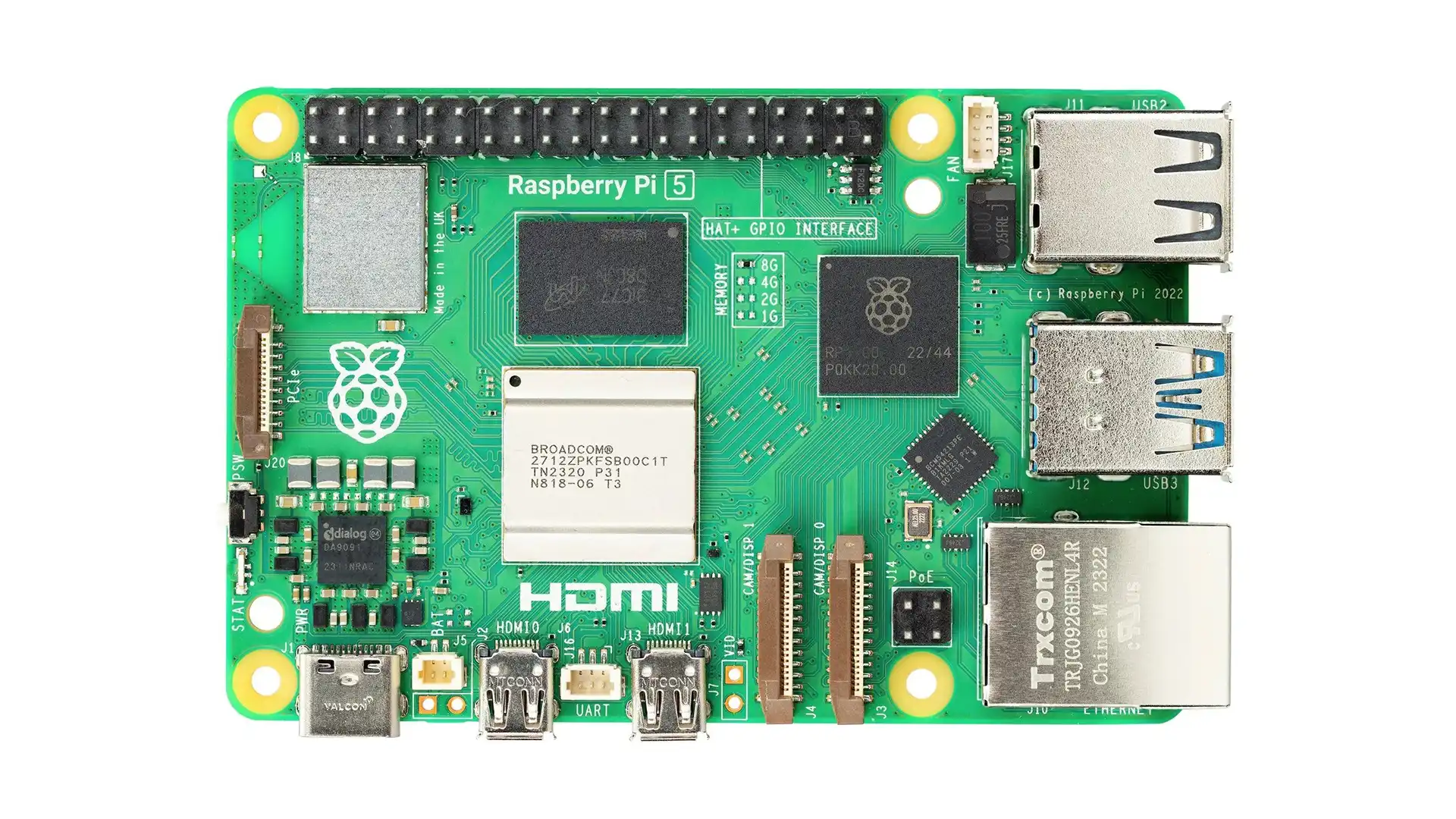
A Raspberry Pi computer combines a processor, memory, connectivity and input/output interfaces on a small printed circuit board. The processor runs the operating system and applications, while RAM holds data that software is actively using. A microSD card or onboard storage holds the operating system, files and programs, depending on the model. Power, a display and input devices can turn a board into a desktop computer; network access and peripherals can make it part of a connected system.
Many models also provide a GPIO (General-Purpose Input/Output) header. GPIO pins let software read digital signals or control external circuits. Other pins and interfaces support protocols such as I²C, SPI and UART. These interfaces are useful for communicating with sensors, displays, converters, motor controllers and other electronic modules. Raspberry Pi GPIO uses 3.3 V logic on typical computer boards, so check the exact model documentation and never connect 5 V signals directly to GPIO pins unless the interface is specifically designed to tolerate them.
To get started, users generally prepare a supported storage device with an operating system, connect the required power supply and peripherals, and follow the setup process. Some projects can run headlessly, meaning the Raspberry Pi is configured and controlled over a network without a dedicated monitor, keyboard or mouse.
Main Hardware Features
Features depend on the model, but common areas to compare include:
- Processor and performance: The processor determines how well the board handles desktop applications, media, networking, image processing and multitasking.
- RAM: More memory helps when running several applications, larger software packages or memory-intensive services.
- Storage: Many Raspberry Pi computers use a microSD card, while some Compute Module variants offer onboard eMMC storage. Storage type affects setup, speed, reliability and product integration.
- GPIO and expansion: GPIO headers and board-specific connectors make it possible to connect HATs, sensors and custom electronics.
- Wired and wireless connectivity: Depending on the model, options can include USB, Ethernet, Wi-Fi and Bluetooth.
- Display and camera interfaces: HDMI outputs, camera connectors and display interfaces vary across the product families.
- Power and thermal needs: The correct supply, cable and cooling arrangement depend on the model and attached peripherals.
Before buying a board, compare the exact model’s memory, ports, wireless features, storage options, physical dimensions and power requirements. Do not assume that every Raspberry Pi board has the same connectors or capabilities.
Raspberry Pi Product Families
Raspberry Pi offers several product families for different uses. The following overview helps distinguish them; exact models, configurations and availability may change over time.
1. Raspberry Pi Single-Board Computers
The flagship Raspberry Pi boards are compact computers that can run a full operating system and support a wide range of applications. Examples include Raspberry Pi 5 and Raspberry Pi 4 Model B, along with earlier generations. They are suited to learning Linux, programming, desktop computing, network services, media projects, computer vision experiments, home automation and general prototyping.
Choose a flagship board when you need a flexible computer with standard peripheral connections and enough processing capability for your application. The best model depends on the software workload, RAM requirement, connectivity, budget and need for expansion. Explore [Raspberry Pi Boards] to compare available models.
2. Raspberry Pi Zero Series
The Zero family prioritises a small physical size and low power use. Raspberry Pi Zero 2 W is a compact computer with wireless connectivity, making it useful for space-constrained projects such as small monitoring devices, simple network-connected cameras, portable interfaces and embedded prototypes. Earlier Zero models may also be suitable for lightweight tasks, depending on software and connectivity needs.
The compact size involves trade-offs: memory, ports and processing performance are more limited than on larger boards. Some Zero boards are sold without a pre-soldered GPIO header, so check the variant before ordering. You may also need model-specific camera cables, adapters or cases. Browse [Raspberry Pi Zero Boards] and [Raspberry Pi Accessories] for compatible items.
3. Raspberry Pi Compute Modules
Compute Modules are designed for embedded products and industrial or commercial integration. Instead of providing all the connectors found on a standard Raspberry Pi computer, a Compute Module exposes the core computing hardware through compact, high-density connectors. It normally requires a compatible carrier or baseboard to provide the interfaces needed by the final product.
This approach lets product developers design a custom board around the computing module, selecting connectors, power circuits, interfaces and mechanical features for their application. Compute Modules can be relevant to control panels, commercial equipment, kiosks, gateways and other embedded systems. Selection requires attention to the module generation, memory and storage configuration, wireless options, carrier-board compatibility and long-term product requirements. Explore [Raspberry Pi Compute Modules] and [Compute Module Carrier Boards].
4. Raspberry Pi Pico Microcontroller Boards
Raspberry Pi Pico boards are microcontroller development boards, not Linux computers. Models based on RP2040 or RP2350 are designed to execute firmware for tasks such as reading sensors, generating control signals, handling simple communication protocols and controlling LEDs, motors or other peripherals through suitable driver circuits. Pico W models add wireless connectivity; available features vary by model.
A Pico is often a better choice than a full Raspberry Pi computer when a project needs direct, repeatable control of hardware with modest computing requirements and quick startup. A full Raspberry Pi computer is usually more suitable when the application needs Linux, a filesystem, multiple high-level applications or substantial networking services. Browse [Raspberry Pi Pico Boards] and [Pico Accessories].
5. Raspberry Pi Keyboard Computers
Keyboard computers integrate Raspberry Pi computing hardware into a keyboard-style enclosure. Raspberry Pi 400 and Raspberry Pi 500 are examples of this product family. They provide a convenient way to set up a compact desktop computing environment with fewer separate parts on the desk.
These systems are useful for education, programming, office-style tasks and general computing where a keyboard-based form factor is preferred. Check the product’s included accessories and required display, power supply and mouse before purchasing. See [Raspberry Pi Keyboard Computers] for current options.
6. HATs, Expansion Boards and Accessories
The wider Raspberry Pi ecosystem includes HATs and expansion boards, camera modules, displays, sensor boards, cables, power supplies, cases, cooling accessories, storage devices and project kits. These products extend what a board can do or simplify assembly.
A HAT or expansion board must match the target board’s physical connector, interface and power limits. Camera and display accessories may use different connector sizes or cable arrangements across models. Also verify voltage levels, current requirements, driver support and mechanical fit. Use [Raspberry Pi HATs and Expansion Boards], [Raspberry Pi Sensors and Modules], [Raspberry Pi Camera Modules], [Raspberry Pi Displays] and [Raspberry Pi Power Supplies, Cases and Accessories] to find suitable parts.
Operating Systems and Programming
Raspberry Pi computers commonly use Raspberry Pi OS, a Linux-based operating system, although other supported operating systems may be available for particular models and use cases. The software environment supports tools for web development, Python programming, networking, data collection, automation and many other tasks. A desktop environment is optional for projects that run as background services.
Pico boards use a different workflow. Firmware can be developed using supported tools and languages such as C/C++ or MicroPython, then programmed onto the microcontroller. Check the documentation for the exact board and development environment before starting. The choice of software should follow the application: use a computer when you need an operating system and higher-level services, and a microcontroller when a small, dedicated firmware program is the better fit.
Common Raspberry Pi Applications
Raspberry Pi products are used across education, hobby projects, prototyping and professional development. Common applications include:
- IoT monitoring: Collect sensor data and send it to a local dashboard or cloud service.
- Home and building automation: Coordinate connected devices, dashboards and automation software, using suitable electrical interfaces and safety-rated hardware.
- Robotics: Process higher-level commands, camera data or navigation tasks; use appropriate motor drivers and real-time controllers where needed.
- Camera and vision projects: Capture images, build time-lapse systems or experiment with computer vision on a model that has adequate performance.
- Network services: Run lightweight servers, local tools, development environments or network monitoring services.
- Industrial and product prototypes: Use a Compute Module and custom carrier board to integrate computing into a larger system.
- Electronics learning: Explore Linux, programming, digital interfaces, networking and hardware-software integration.
For projects involving mains voltage, motors, batteries or other hazardous energy sources, use suitable isolation, protection, enclosure design and qualified review. A Raspberry Pi GPIO pin is not a power driver and should not directly operate high-current or high-voltage loads.
Raspberry Pi vs. a Microcontroller Board
Raspberry Pi computers and microcontroller boards solve different problems. A Raspberry Pi computer can run a full operating system, manage files, connect to networks and run several applications. A microcontroller board such as Raspberry Pi Pico generally starts quickly and runs a dedicated firmware program with direct control of GPIO and peripheral interfaces.
Choose a Raspberry Pi computer for Linux applications, a web dashboard, data logging with higher-level software, camera processing or network services. Choose Pico for compact embedded control, sensor reading, simple automation and firmware-focused tasks. Some projects benefit from using both: a Raspberry Pi computer can handle the user interface or network connection while a microcontroller manages time-sensitive hardware tasks.
How to Choose the Right Raspberry Pi
Start by defining what the project must do, then compare boards against the real requirements.
1. Decide whether you need Linux. If yes, consider a Raspberry Pi computer, Zero model, keyboard computer or Compute Module. If not, Pico may be suitable.
2. Estimate processing and memory needs. Desktop use, camera processing and multiple services typically need more resources than basic sensing.
3. List the required interfaces. Check USB, Ethernet, Wi-Fi, Bluetooth, HDMI, camera/display connectors and GPIO needs.
4. Confirm power and cooling. Select a compatible power supply and consider ventilation or cooling for sustained workloads.
5. Check expansion compatibility. Verify HAT dimensions, GPIO access, connector type, driver support and available current.
6. Plan storage and reliability. Consider the storage type, write activity, backup approach and operating environment.
7. Review the total system cost. Include the board, power supply, storage, case, cooling, cables, display and required expansion hardware.
The lowest-cost board is not always the most economical choice if it lacks the interfaces or performance needed. Review the full requirements before choosing a product.
Frequently Asked Questions
What is Raspberry Pi used for?
Raspberry Pi is used for learning programming, running Linux applications, building IoT systems, connecting sensors, creating robotics and camera projects, hosting lightweight services, and prototyping embedded products.
Is Raspberry Pi a microcontroller?
Most Raspberry Pi computers are single-board computers that can run a full operating system. Raspberry Pi Pico is a separate microcontroller family designed to run firmware directly on the microcontroller.
Which Raspberry Pi is best for beginners?
A flagship Raspberry Pi computer is a flexible starting point for Linux, programming and general projects. Pico is a good starting point for firmware and direct hardware control. The best option depends on the project and budget.
Can Raspberry Pi connect to sensors?
Yes. Supported Raspberry Pi computers and Pico boards can connect to sensors through interfaces such as GPIO, I²C, SPI or UART, depending on the board and sensor. Check voltage levels and interface compatibility before connecting hardware.
Does every Raspberry Pi have Wi-Fi and Bluetooth?
No. Wireless features depend on the model. Check the official specifications for the exact board before purchasing.
Do I need a microSD card for Raspberry Pi?
Many Raspberry Pi computers use a microSD card for the operating system and files, but storage options vary by product. Some Compute Module variants include eMMC, and setup requirements differ for Pico microcontrollers.
What accessories do I need?
Requirements depend on the model and application. A computer may need a compatible power supply, storage, display cable, keyboard, mouse and case. Projects may also need cooling, camera or display cables, HATs, sensors and expansion boards.
Can Raspberry Pi be used for industrial products?
Yes. Compute Modules are designed for embedded integration, but a production design must also consider carrier-board design, thermal performance, power integrity, electromagnetic compatibility, reliability, security, lifecycle and applicable compliance requirements.